


As part of release 10.0.46, performance improvements were implemented in the Accounts Receivable, General Ledger, and Projects data models to enhance report loading time and query execution efficiency. The optimization was validated through structured before-and-after analysis using DAX Studio and VertiPaq Analyzer to assess internal engine behavior. In the initial version, the Auto Date Table feature was enabled, creating system-generated date hierarchies and hidden objects that increased model size and query overhead. In the optimized version, the Auto Date Table feature was disabled, reducing unnecessary date hierarchies and improving overall model structure.
After publishing the optimized models, they were reconnected to associated reports, where minor discrepancies related to date hierarchies were identified and resolved. Performance Analyzer was then used to validate improvements in visual load time and query execution.
Additional optimization activities included removal of hidden objects, improved model compression, and tuning of tables, columns, and partitions involved in data retrieval. These changes reduced query execution time and significantly lowered model size, improving memory efficiency and processing speed. Based on performance analysis, report loading time improved by approximately 24% for Accounts Receivable, 22% for General Ledger, and 41% for Projects. No changes were made to business logic, calculations, or report visuals. Overall, these enhancements provide faster report access, smoother interactions, reduced refresh overhead, and a more stable, scalable reporting experience.
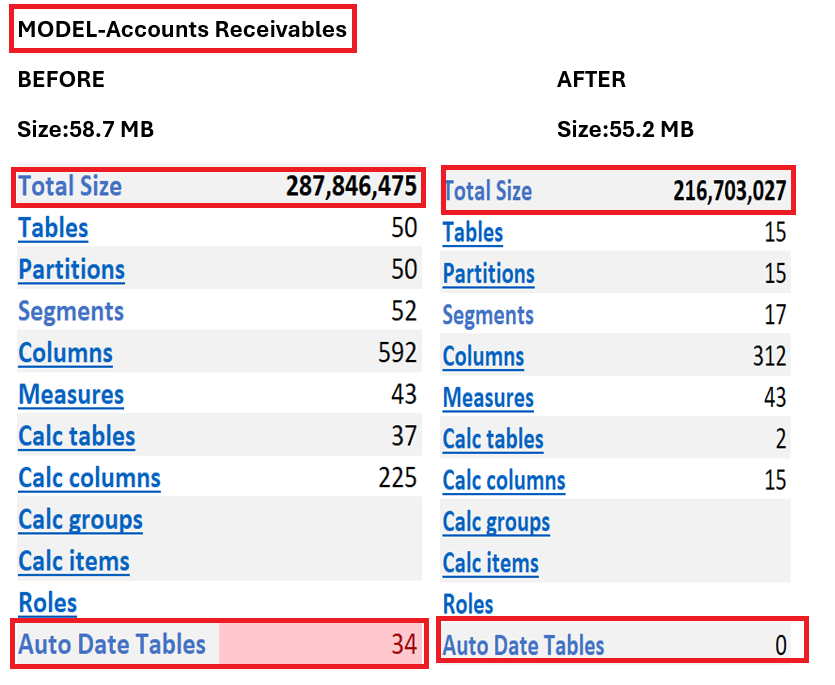
Account Receivables Data Model Performance
Performance improvement in the Accounts Receivable data model was achieved by reducing the dataset processed by the model from 287 million units to 216 million units, representing an approximate 24 % improvement for faster report loading and smoother interactions.
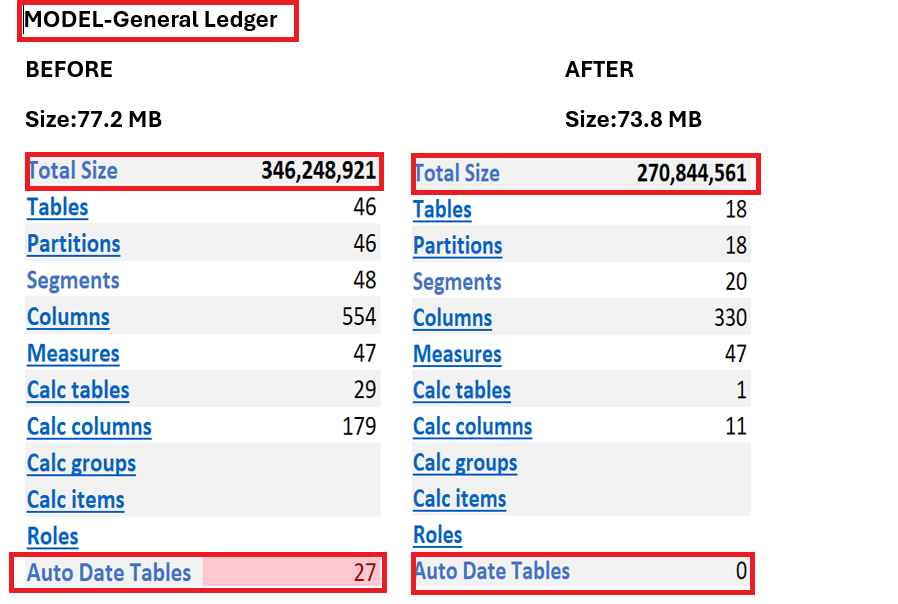
General Ledger Data Model Performance
Performance improvement in the General Ledger data model was achieved by reducing the dataset processed by the model from 346 million units to 270 million units, representing an approximate 22% improvement for faster report loading and smoother interactions.
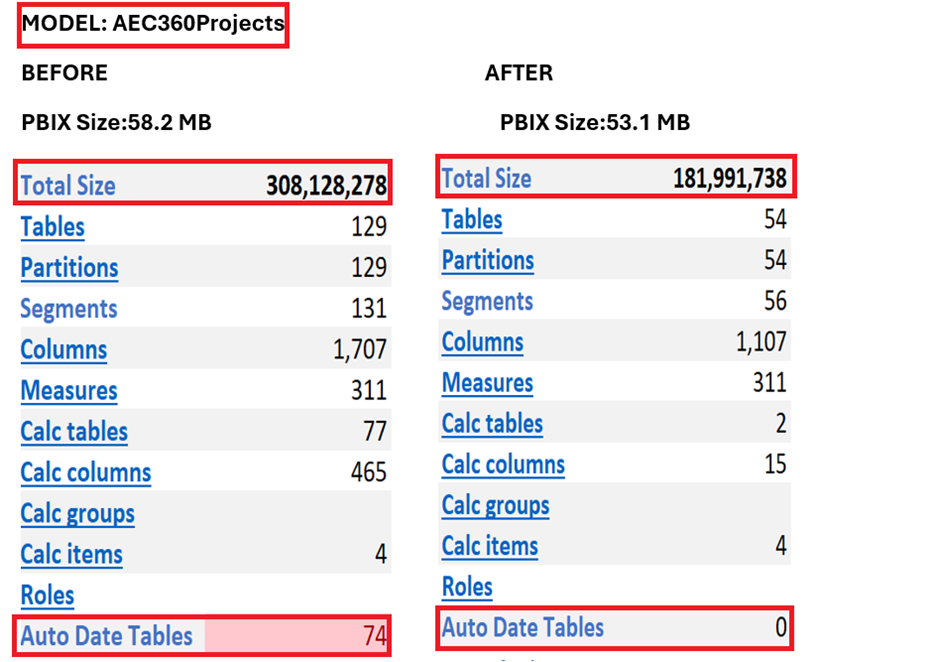
Projects Data Model Performance
Performance improvement in the Project data model was achieved by reducing the dataset processed by the model from 308 million units to 182 million units, representing an approximate 41% improvement for faster report loading and smoother interactions.
Key Terminology Explained
The following terminology explains the components shown in the before-and-after comparison table above, detailing how each element impacts model size and performance.
- Tables: The total number of tables loaded into the model directly impacts complexity. Power BI automatically generates Auto Date/Time tables for each date column, which introduces additional hidden tables into the model.
- Partitions: Partitions define how Power BI internally splits tables during refresh operations. An increase in the number of tables results in a corresponding increase in partitions.
- Segments: Segments are the internal storage blocks within a partition that enable data compression. The Vert iPAQ engine divides each column into multiple segments, typically in increments of one million rows.
- Columns: Vert iPAQ generates internal columns to support relationships, sorting, hierarchies, indexes, and segmentation. All columns—both visible and hidden—are counted in the model size. Auto Date tables alone introduced 7–10 hidden internal columns each.
- Calculated Tables: Calculated tables are created using DAX rather than sourced directly from data. They behave like physical tables and consume memory. Auto Date/Time functionality automatically created one hidden calculated table per date column.
- Calculated Columns: Calculated columns are stored DAX expressions within tables. Auto Date tables generated 7–10 columns per table (e.g., Year, Quarter, Month, Day, Month Number, Quarter Number, Weekday). These columns heavily impact model size.
- Calculation Groups: Calculation groups help avoid creating multiple repetitive measures, simplifying the model.
- Calc Items: Items within a calculation group add logic but do not significantly increase model size.
- Roles: Roles are used for security purposes. They do not contribute meaningfully to model size.
- Auto Date Tables: Power BI automatically generates hidden date tables for each date column.
Understanding Efficiency Improvements
PBIX File Size vs. Vert iPAQ Engine Size
PBIX file size reduction was modest (3–5 MB) across models because it primarily serves as a packaging container that stores metadata and visuals which remained largely unchanged during optimization.
In contrast, the Vert iPAQ engine represents the actual compressed data stored in memory. This is where the significant optimization occurred, with the internal model size reduced by 41% for Projects, 24% for AR, and 22% for GL Models.
Key Impacts of Vert iPAQ Reduction
- Lower memory usage
- Improved query performance
- Faster refresh operations
- Reduced pressure on Power BI service capacity
- Enhanced model compression efficiency
Post your comment on this topic.