


Integrated Resource Planning with Resource Booking Analysis (Beta)
Total Resource Demand Visibility
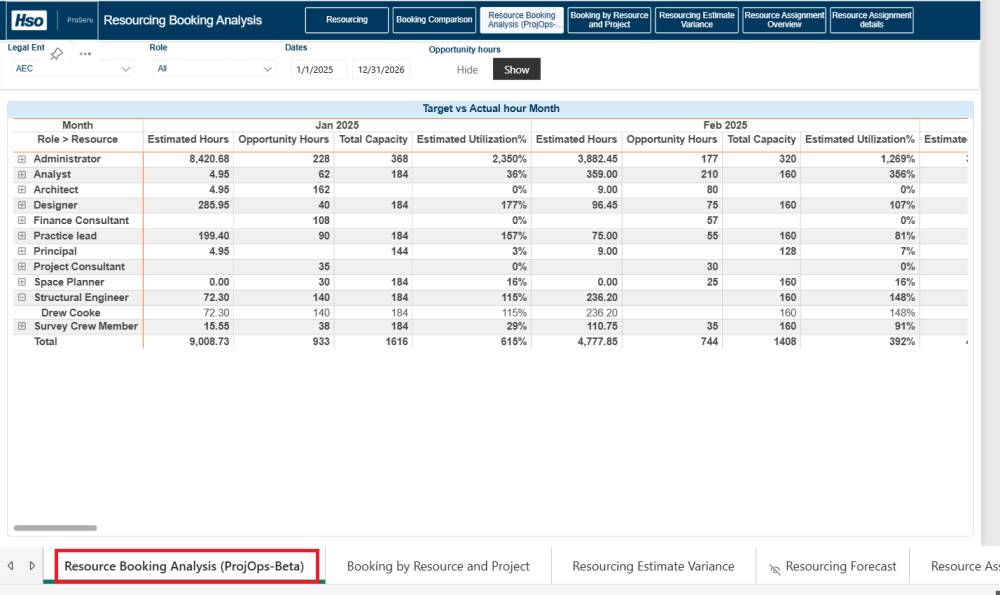
This beta feature enhances resource planning by presenting the impact of potential opportunities on capacity and bookings, helping teams make smarter, proactive decisions. The AEC360 Resourcing report now includes Resource Booking Analysis, combining resource capacity, confirmed bookings (assignments), and opportunity hours from the Fee Estimator in Project Operations. This integration provides a clear view of how projected work affects total resource demand.
Key Metrics
- Estimated Hours: Derived from confirmed bookings (assignments).
- Opportunity Hours: Pulled from opportunity line items in the Fee Estimator.
- Total Capacity: Calculated using the Expanded Calendar to represent the projected work.
- Estimated Utilization %: = Estimated Hours + Opportunity Hours ÷ Capacity
Dynamic Filtering
A new Show/Hide toggle lets you include or exclude opportunity hours in utilization calculations.
- Show: Utilization reflects both booked and opportunity hours for a forward-looking view.
- Hide: Utilization is based only on confirmed bookings for a conservative scenario.
This flexibility allows planners to compare scenarios and adjust strategies with confidence.
Plan Strategically
With Resource Booking Analysis, you can:
- Analyze opportunity backlog alongside booked backlog using Fee Estimator data.
- View resource capacity impact by role or individual resource for accurate forecasting.
These enhancements provides greater visibility into capacity, workload, and utilization to support proactive staffing decisions and improve confidence in resource and revenue planning before opportunities convert to projects.
Data Model Performance Enhancements
Accounts Receivable, General Ledger and Projects Model Performance Enhancements
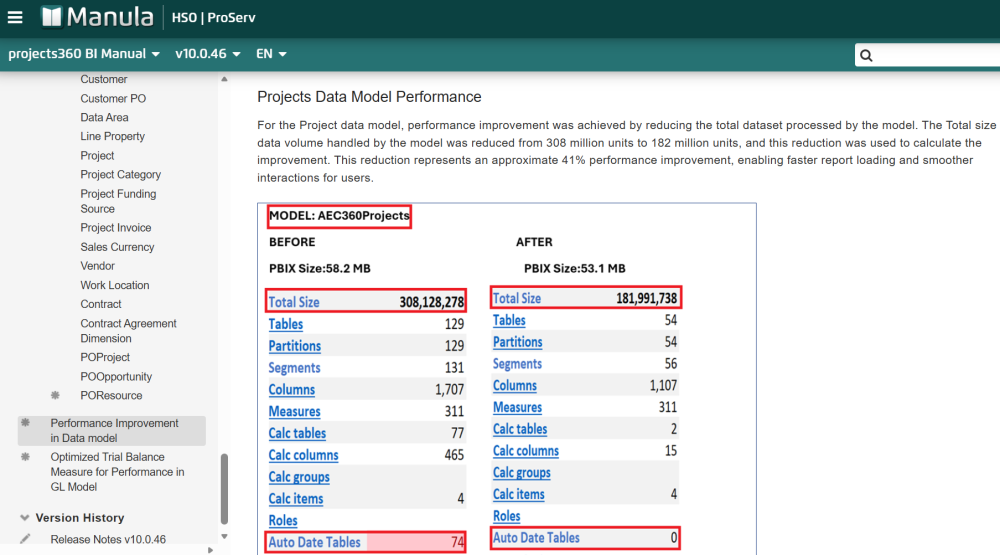
Significant optimizations were applied to the Accounts Receivable (AR), General Ledger (GL), and Projects data models to deliver faster report loading and improved query execution. Through a detailed analysis, model inefficiencies were identified and addressed through targeted optimizations. Key enhancements include:
- Model Optimization: Disabled the Auto Date/Time feature to remove unnecessary automatic date hierarchies, reducing model size and improving compression. Additional refinements included removal of hidden objects and streamlined tables, columns, and partitions for better efficiency.
- Performance Gains:
- Accounts Receivable: average 24% performance improvement
- General Ledger: average 22% performance improvement
- Projects: average 41% performance improvement
- Impact: Lower memory usage, faster refresh cycles, and smoother report interactions. These improvements provide a more stable, scalable reporting experience with reduced service capacity pressure as data volumes grow.
AEC360 Content Pack Report Optimization
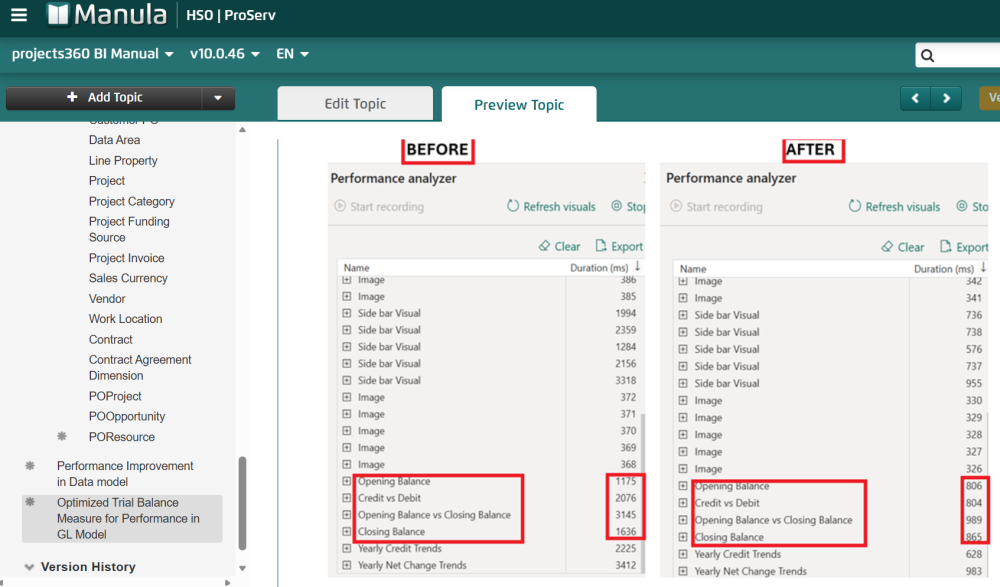
Significant report-level optimizations were applied after reconnecting the reports to the optimized data model introduced in release 10.0.46. Using Performance Analyzer, visual-level load times were evaluated to ensure faster rendering and smoother interactions.
- Report Optimization:
- Connected reports to the optimized model with Auto Date/Time disabled.
- Repaired affected visuals to align with the optimized date logic.
- Optimized high-impact visuals to reduce rendering time and improve responsiveness.
Trial Balance Performance Optimization
This release delivers a major performance enhancement to Trial Balance reporting. By implementing streamlined DAX measures and disabling Auto Date Table behavior, reports now load faster, use less memory, and provide smoother interactions with large General Ledger datasets. Refer to the Optimized Trial Balance Measure Performance section for detailed guidance on the updates, including how the optimization was implemented and the resulting performance improvements.
Key improvements:
- Faster Report Loading: Average 52% reduction in execution time, significantly improving responsiveness.
- Same Trusted Results: Financial logic and outputs remain unchanged.
- Efficient Model Design: Optimized branching patterns reduce complexity and improve scalability.
These updates ensure a more reliable, high-performing Trial Balance experience for timely financial analysis and better decision-making.
Reference & Configuration Enhancements
The following highlights new reference tools and configuration updates that support the BI design and architecture.
Fabric Link Configuration
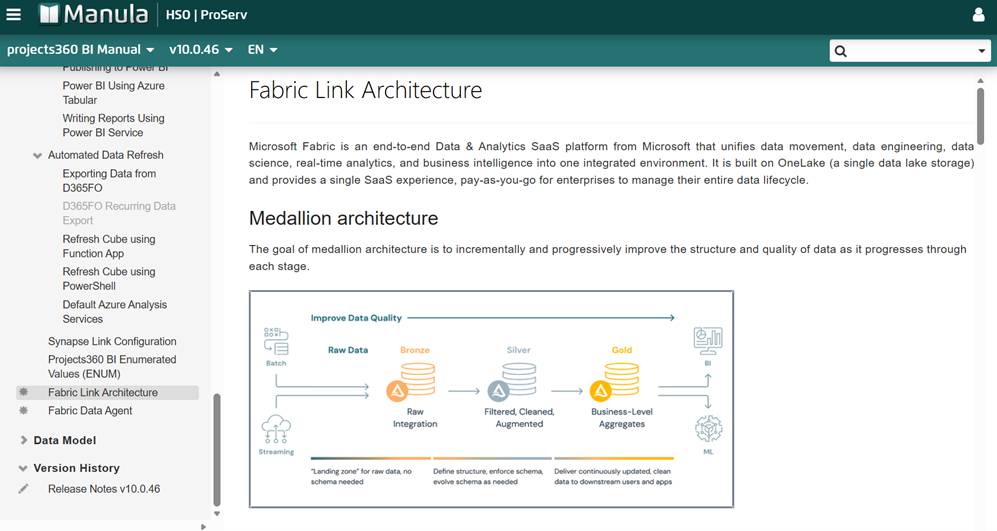
This release introduces comprehensive documentation for configuring the Fabric Link in the Technical Guide section of the manual. The documentation highlights how data is centralized within OneLake and exposed through SQL endpoints, enabling a unified architecture that streamlines analytics. By consolidating data flows, this approach enhances reporting, simplifies maintenance, and provides a scalable foundation for extending solutions.
Post your comment on this topic.