


Summary
In Project Operations, the Expanded Calendar functionality is implemented to support accurate and reliable Capacity KPI calculations for Bookable Resources. Capacity KPIs require booking data to be evaluated across continuous date ranges, rather than as isolated booking records. The expanded calendar evaluates working days, holidays, and availability rules to derive accurate working hours, ensuring capacity values are dynamically calculated and consistently aligned with Project Operations.
This calculation is built on Microsoft Dataverse as its primary data source and utilizes a parameterized Web API URL to establish a connection with the appropriate users environment to dynamically expand resource calendars across the selected date range.
To ensure the solution is reusable and deployable across multiple environments—including Development, Test, and Production—a configurable parameter named DataverseAPIAddress has been implemented. This parameter allows end users to specify their Dataverse environment.
To improve reporting and planning accuracy, new logic calculates resource availability and capacity at a daily level. Each resource’s calendar is expanded into individual working days within the defined date range, providing more precise insights than high-level booking records. This approach supports detailed utilization analysis, trend reporting, and capacity-based KPIs.
In line with standard organizational practices, only business working days (Monday–Friday) are included in capacity calculations. Non-working periods—such as weekends, holidays, and approved leave—are excluded to reflect realistic availability and prevent overstated capacity.
For each valid working day, a default capacity of 8 hours is applied, representing a standard full-time schedule. This consistent baseline enables uniform comparison of availability, utilization, and workload across resources, teams, and time periods.
The logic is designed for flexibility, allowing future enhancements such as part-time schedules, variable hours, or role-specific capacity rules.
These improvements deliver accurate, standardized, and business-aligned capacity calculations, providing reliable insights for operational planning and informed decision-making.
Update the Dataverse Environment Parameter.
Step 1: Open the Projects Model file in Power BI Desktop
Step 2: From the top menu, go to Home and then select Transform Data.
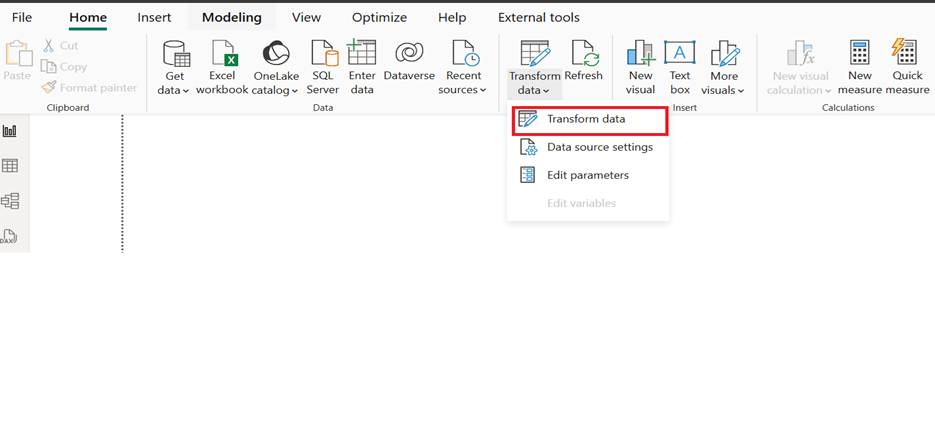
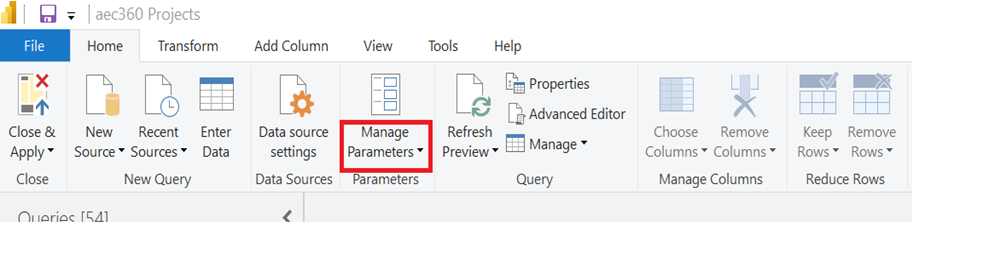
Step 3: In Power Query Editor, click Manage Parameters
Step 4: Select the parameter named DataverseAPIAddress
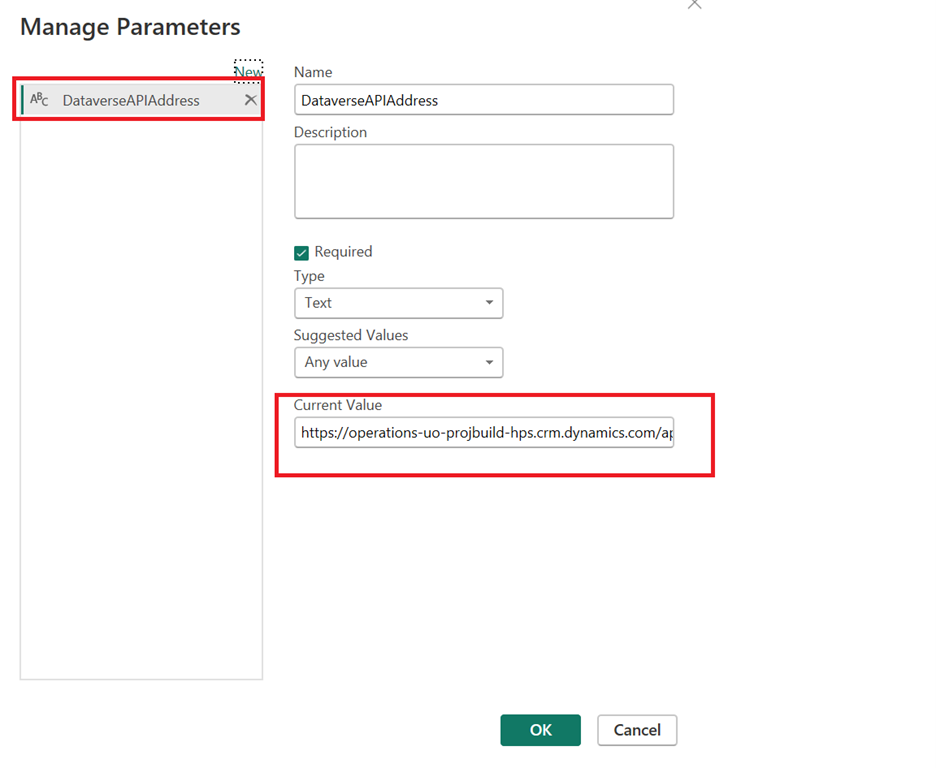
Step 5: Update the Current Value
In Current Value, enter your Dataverse Web API URL Ensure the format matches exactly:
Example : https://.api.crm.dynamics.com/api/data/v9.2/
Click OK
This parameter controls which Dataverse environment the product connects to.
- Update Data Source Credentials
After changing the parameter, credentials must be refreshed. - Configure Data Source Settings:
• In Power BI Desktop, go to File → Options and settings → Data source settings
• Select the Dataverse data source
• Click Edit Permissions
• Sign in using your organization account
• Refresh the Data
Step 6: Apply Changes
- Click Close & Apply in Power Query Editor
- Select Refresh
If the parameter and credentials are correct, the data will load without errors.
User Experience:
- Runs dynamically using the configured API address.
- Automatically expands bookings behind the scenes.
- No manual queries or calendar manipulation required.
- End users simply refresh the report after setting the parameter to view accurate, date aware capacity insights.
Field level functional description
- Bookable Resource: Identifier or name of the resource that can be booked.
- Name: The name of the bookable resource.
- calendarid: The calendar associated with the resource.
- resourcetype: The type/category of the resource.
- vs360_resourceid: A unique identifier for the resource, possibly for integration or tracking.
- Start: The start date/time for the resource’s availability or booking.
- End: The end date/time for the resource’s availability or booking.
- WorkDate: The specific work date for the resource.
- CapacityHours: The number of hours the resource is available or has capacity for.
Post your comment on this topic.